
If you have already downloaded the PakPlay app, the next step is simple: logging in. But many users in Pakistan face small problems at this stage, such as OTP codes not arriving, passwords being rejected, or accounts not opening on a new phone. This updated 2026 guide explains the complete Pakplay login process in clear, easy language, so you can access your account in under a minute and avoid the mistakes that lock users out.
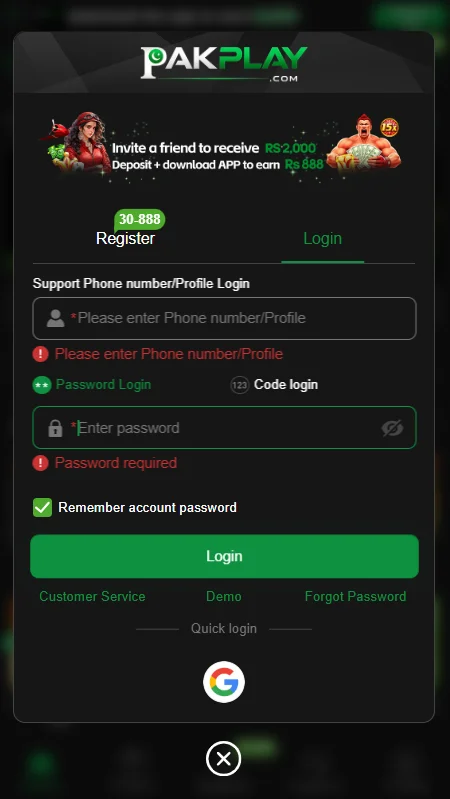
Whether you are logging in for the first time or returning after a break, this article covers every method, every common error, and every safety tip you need.
What You Need Before Logging In to Pakplay
Keep these three things ready before you start:
- The Pakplay app installed from the official source (never use random APK links from unknown websites)
- The mobile number you used during registration
- A stable internet connection (mobile data or WiFi)
If your registered SIM is inactive or removed from your phone, fix that first. Pakplay sends login verification to your registered number, so without access to that SIM, logging in becomes difficult.
How to Login to Pakplay: Step-by-Step Process
Follow these exact steps to log in to your Pakplay account:
Step 1: Open the Pakplay app. Tap the app icon on your phone and wait for the home screen to load.
Step 2: Tap the Login button. You will find it on the top of the screen or inside the profile section, depending on your app version.
Step 3: Enter your registered mobile number. Type the same number you used when creating your account. Double-check the digits, because one wrong number will stop the code from reaching you.
Step 4: Enter your password. If you set a password during registration, type it carefully. Passwords are case sensitive, so check your capital letters.
Step 5: Verify with OTP (if asked). Pakplay may send a one-time code to your number for security. Enter this code within the time limit, usually 60 seconds.
Step 6: Tap Submit or Login. Your account will open, and you will see your balance, games, and withdrawal options exactly where you left them.
The whole process normally takes less than one minute on a good connection.
Pakplay Login with OTP Only (No Password)
Some versions of the app allow a faster login without a password. On the login screen, look for an option like “Login with OTP” or “Get Code.”
- Enter your registered mobile number
- Wait for the SMS code
- Type the code into the app
- You are logged in instantly
This method is useful if you forgot your password. However, never share your OTP with anyone, not even someone claiming to be Pakplay support. Real support teams never ask for your login code.
Common Pakplay Login Problems and Fixes
OTP not arriving: Check that your SIM has balance and network signal. Wait 60 seconds, then tap “Resend Code.” If SMS still does not come, restart your phone and try again.
Wrong password error: Tap “Forgot Password” on the login screen. Pakplay will send a reset link or code to your number. Follow the steps to create a new, strong password.
Account blocked or suspended: This usually happens after too many wrong password attempts or unusual activity. Contact Pakplay support through the official in-app help section and verify your identity patiently. Do not create multiple accounts, because this can cause a permanent ban.
App crashing on login: Clear the app cache from your phone settings, update the app to the latest version, or reinstall it. Your account data stays safe because it is linked to your number, not your device.
New phone, same account: Simply install the app on your new phone and log in with your registered number and password. Your balance and history will sync automatically.
Safety Tips for Your Pakplay Account
Your Pakplay account holds real earning balance, so treat it like a bank account:
- Use a strong password that combines letters and numbers, and do not reuse passwords from other apps
- Never share your OTP, password, or account details with friends, groups, or strangers
- Only log in through the official app, never through links sent on WhatsApp or Facebook
- Log out if you use a shared or public phone
- Enable any extra security option the app offers, such as device verification
Following these habits protects your earnings from hackers and keeps your account in good standing.
Frequently Asked Questions
Can I use Pakplay on two phones at the same time? It is best to use one device. Logging in on multiple devices can trigger a security alert and temporarily block your account.
What if I lose my registered SIM card? Visit your mobile network franchise (Jazz, Telenor, Zong, or Ufone) with your original CNIC to get a duplicate SIM with the same number. Then log in as normal.
Is the Pakplay login free? Yes, logging in costs nothing. Standard SMS charges may apply when receiving an OTP, depending on your mobile package.
Why does Pakplay ask for verification again after an update? This is a normal security step after app updates. Complete the verification once, and you will stay logged in.
Final Thoughts
Logging in to Pakplay is a quick and simple process once you understand the steps: open the app, enter your registered number and password, verify with the OTP, and start playing. Most login problems come from small errors, like a wrong digit, an inactive SIM, or an outdated app version, and all of them have easy fixes. Keep your account details private, use only the official app, and your balance will stay safe every time you log in.
Now that you know exactly how to access your account, you are ready to explore the games and earning features waiting inside. Log in today, check your balance, and make your free time count with Pakplay in 2026.